
Use this dashboard to:
- Monitor PT revenue and new package sales.
- Understand changes to recurring PT EFT draft.
- Track active recurring and PIF members.
- Identify members entering or leaving freeze.
- Monitor cancellations and upcoming expirations.
- Review package- and transaction-level detail.
- Compare PT performance across periods, clubs, employees, service items, and member segments.
Personal Training package and member reporting depends on PT service items being maintained correctly in Easalytics' Service Item Grouping admin. PT Revenue depends on Profit Centers being flagged as PT in the Profit Center Grouping admin.
Understanding the dates:
Sales, revenue, new, lost, newly frozen, and off-freeze metrics use the selected date range.
Active members, active draft, current freeze, and remaining-session metrics are calculated as of the selected end date.
Upcoming metrics look forward 30 days from that end date.
Views in This Dashboard
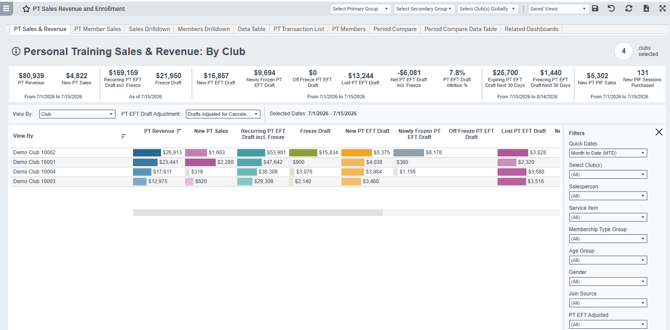
PT Sales & Revenue
Provides the primary financial view of PT activity. It includes recognized PT Revenue, new sales, recurring draft, freeze activity, lost draft, net draft, attrition, upcoming changes, PIF sales, and sessions purchased.
Use View By to analyze results by club, salesperson, service item, package frequency, member segment, or other available dimensions.
PT Member Sales
Focuses on the members associated with PT packages. It includes active recurring and PIF members, current freezes, new and lost recurring members, member attrition, upcoming expirations and freezes, remaining sessions, and new PIF purchasers.
Sales Drilldown and Member Drilldowns
The Sales Drilldown and Member Drilldown views break the selected result into supporting demographic and membership views, including Club, Membership Type Group, Membership Type, Age Group, Gender, and Join Source.
Open these tabs directly or select a bar on PT Sales & Revenue or PT Member Sales and choose View Demographic Drilldown.
Data Table
Displays all your PT metrics from the PT Sales and PT Members tabs in a consolidated table downloadable to excel.
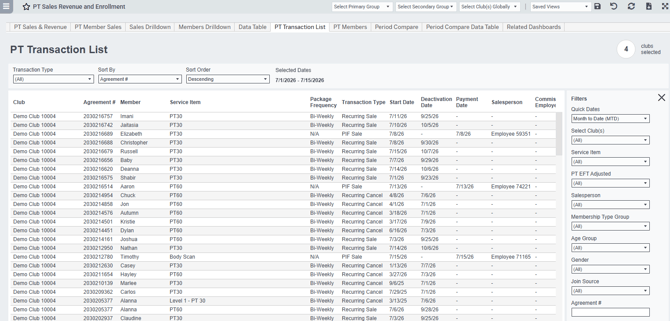
PT Transaction List
Displays transaction-level PT detail for recurring sales, recurring cancellations, PIF sales, and PIF refunds. It includes both original and adjusted EFT draft amounts, allowing users to understand how cancels and rewrites affected reported totals.
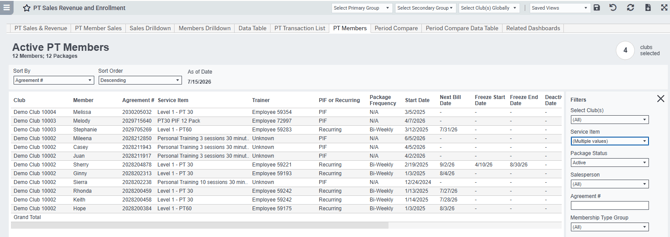
PT Members
Displays active PT packages and their associated members as of the selected date. Because a member may have more than one active package, the same member can appear on multiple rows.
Use the Package Status filter to focus the list on:
- Active
- Active PIF – with Remaining Sessions
- Active Recurring
- Frozen Recurring
- Active Recurring – Freezing Next 30 Days
- Active Recurring – Expiring Next 30 Days
Period Compare
Compares a selected PT metric between Period A and Period B. Preset comparisons include current periods versus prior periods or prior-year periods, with a custom-range option available.
Use Segment and Segment Subtypes to compare specific clubs, employees, service items, package frequencies, or member groups. Select Reset Segment Subtypes when changing the primary segment causes the dashboard to display no data.
Period Compare Data Table
Displays the Period A value, Period B value, and percentage change for multiple PT metrics in one table. This is useful when a full performance comparison is more helpful than analyzing one selected metric.
Related Dashboards
Provides direct links to related Easalytics Personal Training dashboards, including: PT Sales Trends, Trainer Performance, PT Usage, PT Usage Trends, and First PT Purchase Behavior.
Key Functionality
Quick Dates: Choose common periods including MTD, QTD, YTD, prior periods, rolling 7- through 90-day periods, or a custom range.
View By: Change how the primary table is grouped. Available options include Club, Salesperson, Service Item, Membership Type Group, Membership Type, Age Group, Gender, Generation, Join Source, Package Frequency, Service Employee, Commission Employee, Overall, and several combined views.
PT EFT Draft Adjustment: Determines which recurring draft values are used.
- All Drafts: Uses the original new and cancelled PT EFT draft amounts from your member management system.
- Drafts Adjusted for Cancels & Rewrites: Uses the adjusted draft amounts generated for transactions identified as cancellations, upgrades, downgrades, and rewrites.
Click-through actions: Select a bar in the PT Sales & Revenue or PT Member Sales table to open links to the demographic drilldown, supporting transaction list, or active PT member list. The selected row is passed to the destination view.
Transaction Type: Filter the PT Transaction List to Recurring Sale, Recurring Cancel, PIF Sale, or PIF Refund.
Sorting: The PT Transaction List and PT Members views can be sorted by fields such as member, agreement, club, service item, transaction date, package dates, draft amount, paid amount, or remaining sessions.
Forward-looking metrics: Expiring and freezing metrics use scheduled cancellation and freeze dates occurring during the 30 days immediately following the selected end date.
Filters: Available filters vary by tab and can include Club, Salesperson, Service Item, Agreement Number, Membership Type Group, Age Group, Gender, Join Source, and PT EFT adjustment status.
Key Fields
-
Service Item: The PT product, package, or recurring service purchased by the member.
-
Salesperson: The employee associated with selling the PT package.
-
Trainer: The service employee associated with the package. When no service employee is available, the report uses the salesperson as a fallback.
-
Commission Employee: The employee credited with commission for the transaction. This can differ from the salesperson or trainer.
-
PIF or Recurring: Classifies the package as either:
-
- Recurring: A PT service that continues billing on a defined frequency.
- PIF: A package purchased without an ongoing recurring billing schedule.
- Transaction Type: Identifies the row as a Recurring Sale, Recurring Cancel, PIF Sale, or PIF Refund on the Transaction List.
-
Transaction Date: Uses the sale date for recurring and PIF sales, the cancellation date for recurring cancellations, and the payment date for PIF refunds on the Transaction List.
-
Sale Amount: The amount associated with the sale transaction. For a PIF sale without an invoice total, the paid amount is used.
-
Paid Amount and Payment Date: The payment amount associated with the transaction, and the date on which payment was recorded.
-
PT EFT Adjusted: On the Transaction List, displays the adjustment reason attached to an eligible recurring sale or cancellation. Transactions without an adjustment display N/A.
-
Start Date: The date the PT package or recurring service began or was sold on the PT Members view.
-
Next Bill Date: The next scheduled billing date for a recurring PT package.
-
Freeze Start and End Dates: The date the package entered or is scheduled to enter freeze, and the last date of the package’s freeze period.
-
Deactivation Date and Reason: The package cancellation or deactivation date, and the source-system reason associated with the package’s deactivation.
PT EFT Draft Adjustment Setting
Adjusted PT EFT Draft is a logical calculation of your New, Lost, and Net PT EFT Draft, the logic
-
removes sales that are cancelled within 30-days,
-
only counts the incremental amount of a package that is upgraded, downgraded, or rewritten at the same value,
-
and does not count the member enrolled as new or lost if they upgraded, downgraded, or rewrote.
This logic removes the noise of cancellations and members changing packages.
This updated logic is an attempt to better represent the additions and subtractions to your monthly PT EFT Draft, improving the accuracy of your New and Cancelled PT EFT Draft monthly metrics.
The PT Transaction List can show you exactly how a transaction was adjusted for New or Cancelled PT EFT.
Common Dashboard Use Cases
- Compare recognized PT Revenue with new PT selling activity.
- Identify which clubs, employees, or service items are adding or losing recurring draft.
- Monitor freeze activity and scheduled cancellations before they affect future billing.
- Review active PIF members and their unused-session balances.
- Reconcile original and adjusted recurring draft amounts.
- Compare PT performance against a prior month, quarter, year, or custom period.
- Audit individual packages and transactions when summary results require more detail.
Metric Definitions
- PT Revenue: Revenue recognized during the selected date range from profit centers configured as Personal Training. Revenue follows the account’s configured revenue-recognition method and is not necessarily the same as the value of packages sold during the period.
- New PT Sales: The PT point-of-sale sales amount associated with new recurring and PIF package transactions during the selected date range. This measures selling activity rather than recognized PT Revenue.
- Recurring PT EFT Draft incl. Freeze: The monthly-equivalent draft value of recurring PT packages active as of the selected end date, excluding packages currently on freeze. Draft associated with currently frozen packages is displayed separately as Freeze Draft. Active Recurring PT EFT Draft
- Freeze Draft: The monthly-equivalent PT EFT draft associated with recurring packages currently frozen as of the selected end date.
- New PT EFT Draft: The monthly-equivalent draft value of new recurring PT packages sold during the selected date range. The value is based on the package price and billing frequency and does not represent revenue already collected or recognized.
- Newly Frozen PT EFT Draft: The monthly-equivalent draft associated with recurring PT packages whose freeze begins during the selected date range.
- Off Freeze PT EFT Draft: The monthly-equivalent draft associated with recurring PT packages whose freeze ends during the selected date range.
- Lost PT EFT Draft: The monthly-equivalent draft associated with recurring PT packages cancelled or deactivated during the selected date range.
- Net PT EFT Draft incl. Freeze: New PT EFT Draft, minus Newly Frozen PT EFT Draft, plus Off Freeze PT EFT Deraft, minus Lost PT EFT Draft.
- PT EFT Draft Attrition %: Lost PT EFT Draft divided by the active recurring PT EFT draft, excluding freeze, as of the selected end date.
- Expiring PT EFT Draft Next 30 Days: The monthly-equivalent draft associated with recurring PT packages scheduled to cancel during the 30 days following the selected end date.
- Freezing PT EFT Draft Next 30 Days: The monthly-equivalent draft associated with recurring PT packages scheduled to enter freeze during the 30 days following the selected end date.
- New PT PIF Sales: The sales value of new PT packages purchased without an ongoing recurring billing schedule during the selected date range.
- New PIF Sessions Purchased: The total number of sessions included in new PIF packages sold during the selected date range.
- Total Active PT Members: The distinct number of members who, as of the selected end date, have either an active recurring PT package or an active PT package with remaining sessions.
- Active Recurring PT Members incl. Freeze: The distinct number of members with an active recurring PT package as of the selected end date, less members currently frozen. Frozen members are displayed separately as Freeze Members.
- Freeze Members: The distinct number of recurring PT members whose packages are currently frozen as of the selected end date.
- New Recurring PT Members: The distinct number of members who purchased a recurring PT package during the selected date range. When adjusted reporting is selected, transactions carrying a PT EFT adjustment reason are excluded.
- % First Time Recurring PT Purchasers: The percentage of New Recurring PT Members whose purchase was their first recorded PT purchase.
- % Purchased Recurring on Join Date: The percentage of New Recurring PT Members who purchased their recurring PT package on their membership join date.
- Newly Frozen Recurring PT Members: The distinct number of recurring PT members whose freeze begins during the selected date range.
- Off Freeze Recurring PT Members: The distinct number of recurring PT members whose freeze ends during the selected date range.
- Lost Recurring PT Members: The distinct number of recurring PT members whose packages were cancelled or deactivated during the selected date range. The PT EFT Draft Adjustment selection also applies to this metric.
- Net Recurring PT Members incl. Freeze: New Recurring PT Members minus members currently frozen as of the selected end date, minus Lost Recurring PT Members.,
- PT Member Attrition %: Lost Recurring PT Members divided by active recurring PT members, excluding freeze, as of the selected end date, excluding members currently frozen.
- Expiring Recurring PT Members Next 30 Days: The distinct number of recurring PT members scheduled to cancel during the 30 days following the selected end date.
- Freezing Recurring PT Members Next 30 Days: The distinct number of recurring PT members scheduled to enter freeze during the 30 days following the selected end date.
- Active PT PIF Members: The distinct number of members with an active PT package and unused sessions as of the selected end date.
- Remaining Sessions: The total number of unused sessions remaining on active PT packages as of the selected end date.
- New PT PIF Members: The distinct number of members who purchased at least one PIF PT package during the selected date range.
- Period A: The current or primary period selected for comparison.
- Period B: The prior or comparison period.
- % Change from Period B: Period A minus Period B, divided by Period B.
- % First Time Recurring PT Purchasers: The percentage of New Recurring PT Members whose recurring PT purchase was their first recorded PT purchase. Calculated as first-time PT purchasers who bought a recurring package during the selected date range divided by all New Recurring PT Members during that period.
- % Purchased Recurring on Join Date: The percentage of New Recurring PT Members who purchased their recurring PT package on their membership join date. Calculated as distinct recurring PT purchasers whose PT purchase occurred on their join date divided by all New Recurring PT Members during the selected date range.
- % Purchased PT PIF on Join Date: The percentage of members who purchased a new PIF PT package during the selected date range and made that purchase on their membership join date. Calculated as distinct PIF purchasers who purchased on their join date divided by all distinct members who purchased a PIF PT package during the selected period.